
Key Takeaways
CoinTracking lists a transaction as missing when a deposit or withdrawal has no counterpart, usually because a wallet, exchange or chain was never imported or an entry is misclassified; the fix starts under Analysis → Checks → Missing Transactions.
- ✓ Most common cause: not all exchanges/wallets ever used are imported – then scam tokens, API gaps, bridges
- ✓ Each chain must be imported separately (Ethereum, Polygon, Arbitrum, etc.)
- ✓ CoinTracking matches deposits/withdrawals automatically in % – always check low (red) matches
CoinTracking shows hundreds of entries under "Missing Transactions"? This can mean two things: either not all sources are imported – then the data really is missing – or the imported deposits and withdrawals are misclassified, which is why CoinTracking shows them as missing. In both cases CoinTracking doesn't know where an asset came from or where it went – it doesn't know the specific background of your inflows and outflows that only you know and that isn't on the blockchain. Exactly these unpaired deposits and withdrawals cause follow-up errors in the tax report. In this article, you'll learn what this means and how to systematically resolve the causes.
01 The Problem: Missing Transactions in CoinTracking
"Missing Transactions" in CoinTracking almost never means a database entry disappears. It means: for a deposit or withdrawal, the counterpart is missing. Example: you transfer ETH from Binance to your wallet. In CoinTracking, the withdrawal from Binance appears – but the deposit to the wallet is missing because the wallet (or that specific chain) simply isn't imported. CoinTracking actually pairs deposits and withdrawals automatically: it matches them by amount, chronology and time accuracy and rates each match as a percentage – from Exact through High, Medium and Low down to No Match. If the counterpart is missing entirely, the deposit or withdrawal stays unpaired.
Under Analysis → Checks → Missing Transactions you can display all matches (the "All Deposits & Withdrawals" view, disable the "hide 90–100% matches" filter) – with the accuracy in percent and filters like "Amount accuracy" or "Time accuracy". Matches rated as a low (red) match are worth examining individually: in most cases they hide inconsistencies that lead to data errors in the tax report. In its reconstruction work, TX-Partner goes through exactly these low-rated matches and pairs the counterparts correctly before CoinTracking calculates the report.
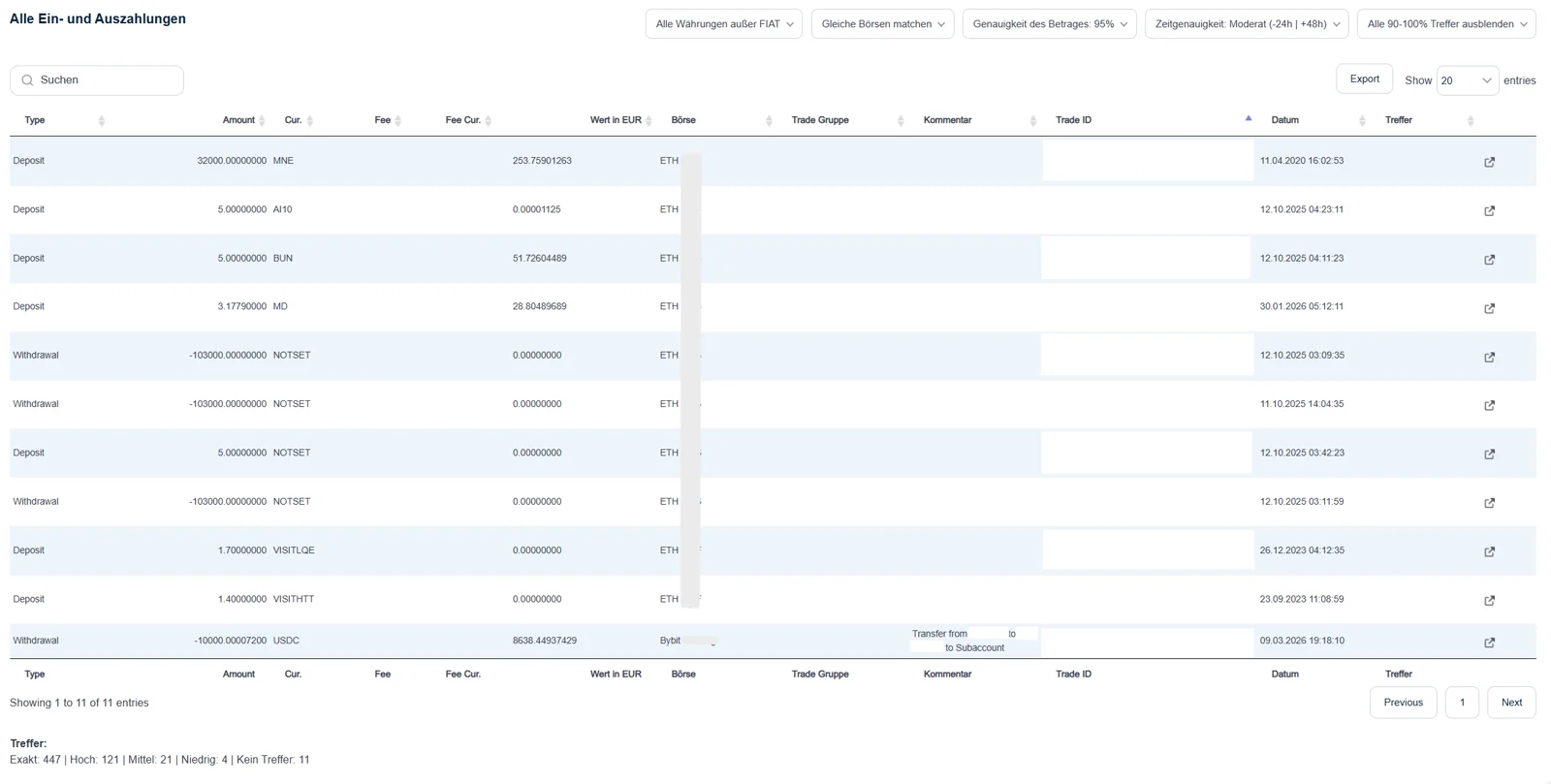
Important to understand: this view is only a lens, not the result. You can widen the tolerance (e.g. amount accuracy 90 %, a generous time window) to really see all deposits and withdrawals – or set it very tight at 100 %, so only exact pairs remain. At 100 % even a small fee error drops out of the match: a withdrawal only pairs cleanly when withdrawal minus the network fee equals the deposit amount – if a fee is missing or shifted, the accuracy drops to, say, 95 %. But whether everything is actually assigned correctly is decided not by this view but by the tax report – that's where the real warnings and follow-up errors show up.
The diagnosis in CoinTracking always follows the same path: Analysis → Checks → Missing Transactions. This check shows you at a glance all deposits and withdrawals that don't have a transfer counterpart.
Source: CoinTracking Help Center
Recognizing Missing Transactions:
Unpaired Deposits
Deposits without a corresponding withdrawal on the source side. CoinTracking doesn't know where the asset came from.
Unpaired Withdrawals
Withdrawals without a corresponding deposit on the destination side. CoinTracking doesn't know where the asset went.
Scam & Spam Tokens
Unwanted airdrops and scam tokens create deposits without counterparts – one of the most common causes in CoinTracking.
Follow-up Errors in Tax Report
Unpaired deposits and withdrawals cause warnings in the tax report: they lead to incorrect acquisition costs – from which CoinTracking then calculates wrong gains.
02 Why Are Transactions Missing?
The causes of unpaired deposits and withdrawals are diverse. Most often, simply not all exchanges and wallets ever used are imported – or at one exchange only the trades are imported, but not the deposits and withdrawals. On top of that come scam and spam tokens, incomplete API imports, and bridges and cross-chain swaps.
- Not All Sources Imported – The most common and simplest cause: an exchange or wallet you used earlier is missing entirely. Or at an exchange only the trades were imported, not the deposits and withdrawals. Then CoinTracking lacks the counterpart of every transfer.
- Scam & Spam Tokens/NFTs – Unwanted airdrops and scam tokens create deposits without counterparts. CoinTracking cannot assign these and lists them as "missing transactions". One of the most common causes in CoinTracking.
- Incomplete API Imports – Exchange APIs don't export everything. Internal transfers, staking rewards, or older transactions are often missing. CSV supplements are necessary so deposits and withdrawals can be fully paired. For exchanges like MEXC, Bybit, or KuCoin, the Balance per Exchange view in CoinTracking helps spot gaps per platform.
- Bridges & Cross-Chain Swaps – In cross-chain swaps, asset A goes out and asset B comes in – CoinTracking doesn't recognize the connection because different assets are involved. With bridges, the destination chain is often missing from the import (e.g., only Ethereum imported, but not Base after a bridge).
- Manual Transfers Not Assigned – OTC deals, P2P transfers, ICOs/pre-sales (tokens often arrive much later than the payment went out), gifts within the family, or crypto payments. The transaction exists in CoinTracking, but the type is incorrectly classified – e.g., "Deposit" instead of "Payment" or "Trade".
- Missing Chain Imports for Wallets – You've imported your Ethereum wallet, but not the same address on Polygon, Arbitrum, or Base. Each chain must be recorded separately so transfers can be paired.
In practice, almost always a combination of these causes applies. Anyone who has been active for several years and used various platforms must proceed systematically to find all gaps. Missing transactions lead to wrong balances and acquisition costs – and thus to a faulty calculation in the tax report – because CoinTracking cannot correctly track the origin or whereabouts of assets.
Quick Reference: Missing Transaction → Cause → Solution
| Missing Transaction | Probable Cause | Solution |
|---|---|---|
| Many unknown deposits | Scam/spam token airdrops | Mark contract as scam |
| Withdrawal without deposit at destination | Destination wallet not imported | Import wallet address per chain |
| Deposit without withdrawal at source | Source exchange not imported | Re-import CSV export |
| Bridge transfer only one side | Deposit and withdrawal assets differ | Link via a Trade entry |
| OTC/P2P transfer as deposit | Wrong transaction type assigned | Set correct transaction type (e.g., Payment, Trade) |
03 Find Missing Transactions Systematically
The good news: CoinTracking offers its own check to specifically find missing transactions. The path is always the same: Analysis → Checks → Missing Transactions.
Step 1: Open Check "Missing Transactions"
Navigate to Analysis → Checks → Missing Transactions. This check shows you a list of all deposits and withdrawals that don't have a matching transfer counterpart. The list can be sorted by asset, date, EUR value, or exchange – so you can quickly recognize patterns and process the most relevant entries first.
Step 2: Research the Transaction Hash
For each entry in the list, you should check the transaction hash. Search the hash in a blockchain explorer like Etherscan or in analysis tools like Arkham. There you'll see where the transaction came from or where it went and can understand why CoinTracking classifies it as "missing".
Step 3: Understand the Cause
There are several typical reasons why a transaction is shown as "missing":
- Wrong TX Type: A deposit is actually a reward or airdrop – so there is no transfer counterpart because it's not a transfer.
- Withdrawal is not a Transfer: It's a payment, loan repayment, or other expense that doesn't need an incoming counterpart.
- Missing Source: The destination wallet or source exchange simply wasn't imported – the counterpart doesn't exist in the data.
Step 4: Perform Correction
Depending on the cause, there are two solution paths: Either you adjust the transaction type (e.g., from "Deposit" to "Airdrop" or from "Withdrawal" to "Payment") – or you import the missing source (wallet or exchange) so the transfer counterpart is present in the data and CoinTracking can make the assignment.
Path: Analysis → Checks → Missing Transactions
04 Add Missing Transactions
Once you've identified the missing sources, it's about getting the data correctly into CoinTracking. Depending on the source, there are different ways.
CSV Import from Exchanges
The CSV import is often the most reliable way – especially for older data that's no longer available via API. Log into the respective exchange, download the complete trade export, and import it via the CoinTracking import page. Make sure to select the correct CSV parser – CoinTracking offers predefined formats for most exchanges.
Add Wallet Addresses
Thoroughness is crucial here: Each chain must be imported separately. If you have an Ethereum address that was also active on Polygon, Arbitrum, Optimism, Base, or Solana, you must perform the import for each of these chains – on Solana, verify the entries against Solscan, since the address shows up there rather than on Etherscan. A single missing chain import can swallow dozens of transactions, and any transfer or withdrawal whose other side sits on a chain you haven't imported stays unpaired until both sides are present.
This is exactly where the unpaired entries come from: a withdrawal from one chain with no matching deposit on the next. TX-Partner reconstructs these missing counterparts from the on-chain data of both chains and the matching exchange exports, so CoinTracking pairs the transfer and calculates the correct cost basis instead of a phantom disposal.
Manual Entries
For transactions that cannot be imported automatically – OTC deals, P2P transfers, airdrops from unsupported protocols – you must create manual entries. Use the CoinTracking input mask for this and pay attention to correct timestamps, quantities, and transaction types.
Closed Exchanges: GDPR Data Request
For closed exchanges like FTX, there's an option many don't know: the GDPR data request. Under the GDPR, you have the right to a copy of your personal data. For exchanges in insolvency, you direct this request to the insolvency administrator. Alternatively, on-chain transactions can be reconstructed via blockchain explorers like Etherscan or Solscan.
API vs. CSV: Which Way When?
As a rule of thumb: API for ongoing, current data – it synchronizes automatically and keeps the account up to date. CSV for historical data and one-time imports – especially when the API no longer delivers older transactions. In many cases, a combination of both makes sense: CSV for the past, API for ongoing synchronization.
Import Methods Overview:
API Import
Automatic synchronization for active exchange accounts. Ongoing data, but often limited for historical transactions.
CSV Import
Complete trade history of an exchange. Especially important for older data and closed accounts.
Wallet Import
Blockchain-based import. Each chain individually – Ethereum, Polygon, Arbitrum, Solana, etc. add separately.
Manual Entry
For OTC deals, P2P transfers, and non-importable sources. Care with timestamps and amounts required.
05 Fix CoinTracking CSV Import Errors & API Gaps
A few hints that save a lot of time in practice and avoid typical mistakes.
Treat Scam Tokens Correctly
Scam tokens appear in almost every wallet: Tokens you never bought and that suddenly appear in your CoinTracking. They distort the balance and can create incorrect holdings. The solution in CoinTracking: Mark the contract as scam OR change the ticker so it's not confused with a real asset. This way the transaction remains documented without falsifying the calculation.
Diagnostic Path Always the Same
When you're looking for missing transactions, the starting point is always the same: Analysis → Checks → Missing Transactions. Make it a habit to check this after every import. This way you immediately recognize whether the import was successful or whether new unpaired deposits/withdrawals have arisen.
After Import: Compare Balances
After every import, you should compare the CoinTracking balances with the actual balances on your wallets and exchanges. Only this way do you ensure that no transactions are missing and no duplicates have been created. This is especially important after a CSV import, as overlaps with existing API data occur more easily here.
Don't Use "Import All Wallets"
CoinTracking offers a function that suggests you can import all wallets at once. This is not recommended. Better: Specifically import individual wallet addresses per chain and after each import check via Analysis → Checks → Missing Transactions whether new unpaired entries have arisen.
For a comprehensive overview of the most common CoinTracking problems and their solutions: All CoinTracking Errors Overview.
06 The Logic Chain: Why Missing Transactions Affect Everything
Missing transactions are not an isolated problem. They affect the entire chain – from crypto accounting through tax calculation to compliance.
The Sequence:
Crypto Accounting
All transactions from all sources – exchanges, wallets, DeFi – fully recorded in CoinTracking. This is the foundation.
Tax Calculation
CoinTracking calculates profits and losses based on this data. Missing transactions lead to incorrect acquisition costs and thus to incorrect results.
Compliance
The tax advisor and the tax office work with the figures from the tax calculation. If the basis is wrong, nothing is right.
Missing transactions lead to incorrect balances. Incorrect balances lead to incorrect acquisition costs. Incorrect acquisition costs lead to incorrect tax calculation. And an incorrect tax calculation becomes a problem at the latest when the tax office compares the data with the DAC8 reports from exchanges.
07 Why Missing Transactions Distort Your CoinTracking Tax Report
Missing transactions are not just a display issue. CoinTracking always calculates with what's there – if the counterpart of a deposit is missing, the acquisition cost basis is missing too, and CoinTracking sets it to 0 €. As soon as the affected asset is later swapped or used further, CoinTracking derives an inflated gain from it. TX-Partner is not a tax advisor – but from 600+ cases TX-Partner knows the pattern of how a gap in the documentation turns into a miscalculated tax report.
How Missing Transactions Affect the CoinTracking Report
| Situation | What's behind it | Effect / risk |
|---|---|---|
| Unpaired deposit | Acquisition cost = 0 € | Gain massively overestimated as soon as the asset is swapped or sold |
| Unpaired withdrawal | Outflow with no recognized destination | Points to a gap – a compliance matter at data review (where did the asset go?), not a pure calculation error |
| Scam token as deposit | Phantom inflow, often with a fake ticker | Not real income – but distorts balances and valuation, a possible compliance matter |
| Missing chain imports | Counterpart on the destination chain is missing | A compliance matter at data review. CoinTracking does not – unlike Blockpit – automatically treat the outflow as a sale |
The effect compounds: a single unpaired deposit carries through every later transaction with the same asset. With DAC8, exchanges will report their transaction data directly to tax authorities from 2026 – a report calculated on an incomplete data basis then visibly deviates from those reports. That's why the clean data basis is the real lever, not the tool export.
08 When TX-Partner Can Help
Many missing transactions can be found and added yourself using the procedure described here. But there are situations where the effort exceeds the scope of a self-project.
- With dozens of missing sources – If you've used many exchanges and wallets over the years and the gaps run through the entire transaction history, processing becomes complex. TX-Partner systematically works through all sources and brings the crypto accounting into a consistent state.
- With closed exchanges – Reconstructing data from closed exchanges requires GDPR requests, on-chain research, and manual entries. TX-Partner has experience with the most common cases and knows the processes.
- With complex DeFi portfolios with multi-chain activities – Anyone active on Ethereum, Polygon, Arbitrum, Solana, Avalanche, and other chains and using DeFi protocols has a transaction history that CoinTracking alone cannot fully map. TX-Partner takes over the complete recording and assignment of all chains and protocols.
CoinTracking Specialists for Austria and Germany
Crypto accounting works differently in Austria and Germany. CoinTracking needs to be configured separately for each country, otherwise the tax report won't add up.
TX-Partner is among the recognized experts for crypto data preparation and has worked with you on many portfolios from AT and DE, often hand in hand with the respective tax advisor. You don't get a default configuration, you get the settings that fit your country, your setup, and your activity, from old holdings to DeFi wallets.

Co-Founder & Crypto Accounting Pioneer
Robert Thorn is Co-Founder of TX-Partner. Brings experience from over 600 documented crypto portfolios, from simple Bitcoin trading to six-figure DeFi setups across multiple chains and years. Closes the gap between raw data and clean documentation for tax and banks.