At a glance
CoinTracking is, in TX-Partner's assessment, a professional tool with full edit access and an annual subscription, cheaper for catching up on several tax years. Blockpit guides you through a fixed framework per tax year, ideal for straightforward portfolios. Neither fills gaps in your transaction history.
- ✓ What neither tool does: fill in missing transaction history. If the data foundation has gaps, both tools calculate on the wrong basis
CoinTracking or Blockpit? Most comparisons on the web list features and tick checkboxes. This article takes a different approach. It is based on daily work with both tools across more than 600 cases. No affiliate links, no sponsored reviews. Instead: practical experience, personal assessment, and an honest recommendation on which tool suits which type of user.
01 Data Import: Where the Differences Begin
Let's start with data import. A key difference: when you add an EVM address in Blockpit, the tool optionally offers to import all EVM-compatible chains at once. This is a convenient feature in principle, but it has a downside. Many users activate this option unknowingly and end up loading unused chains with hundreds of scam transactions into their portfolio without realizing it.
With CoinTracking, you add each address and exchange individually. It requires more work, but you can specify an exchange name, start date, and additional details directly in the input form. This is especially helpful for complex portfolios with many integrations.
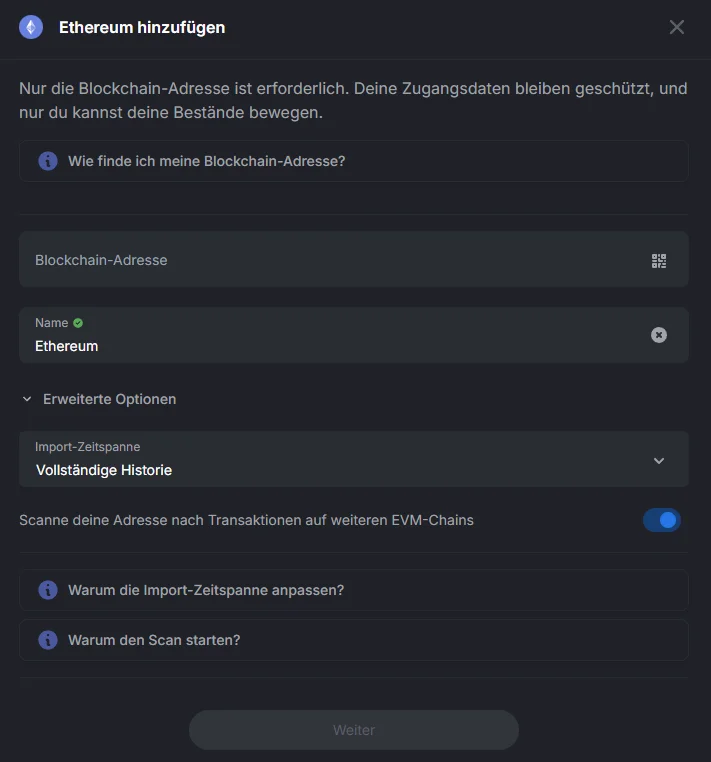
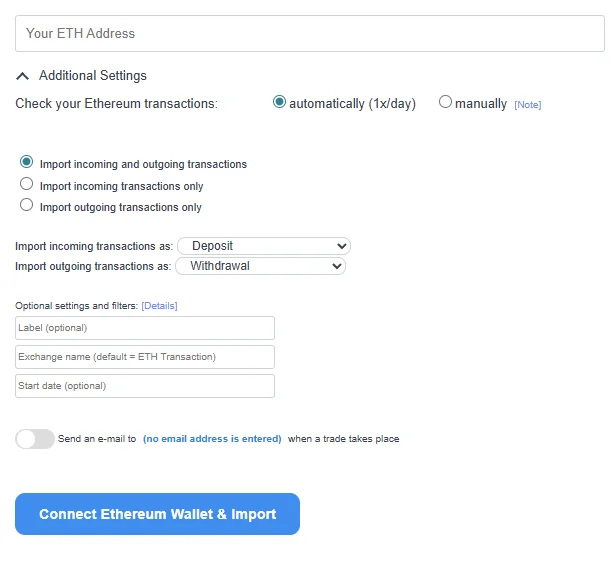
In general, both tools offer numerous blockchain imports and exchange connections. On pure integration breadth, TX-Partner would not favor either. However, there is a difference in import methods: CoinTracking frequently offers native CSV imports for exchange data. In TX-Partner's experience, Blockpit leans more toward an API-first approach. This becomes relevant when exchange APIs deliver incomplete data and you need a combination of API and CSV. CoinTracking has had a clear advantage here in the past. Blockpit is catching up, though, and now offers more CSV imports. TX-Partner currently gives this point to CoinTracking.
02 Token Classification and Spam Detection
When it comes to the data import itself, Blockpit has a major advantage: token classification. With Blockpit, you can quickly distinguish between scam tokens and legitimate coins because the contract address serves as verification in the background.
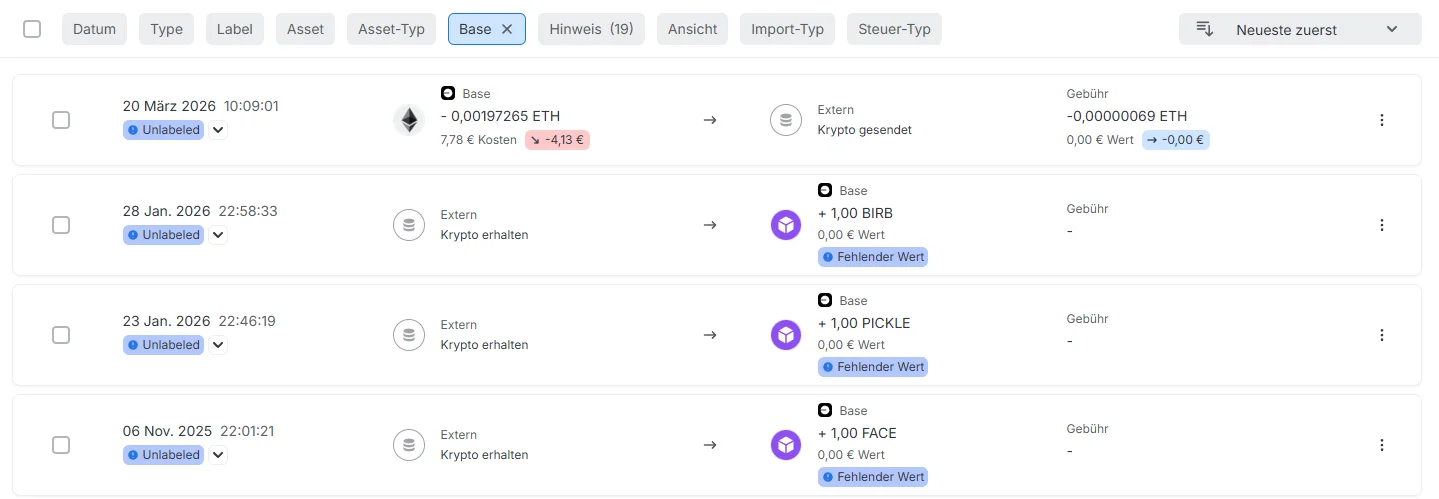
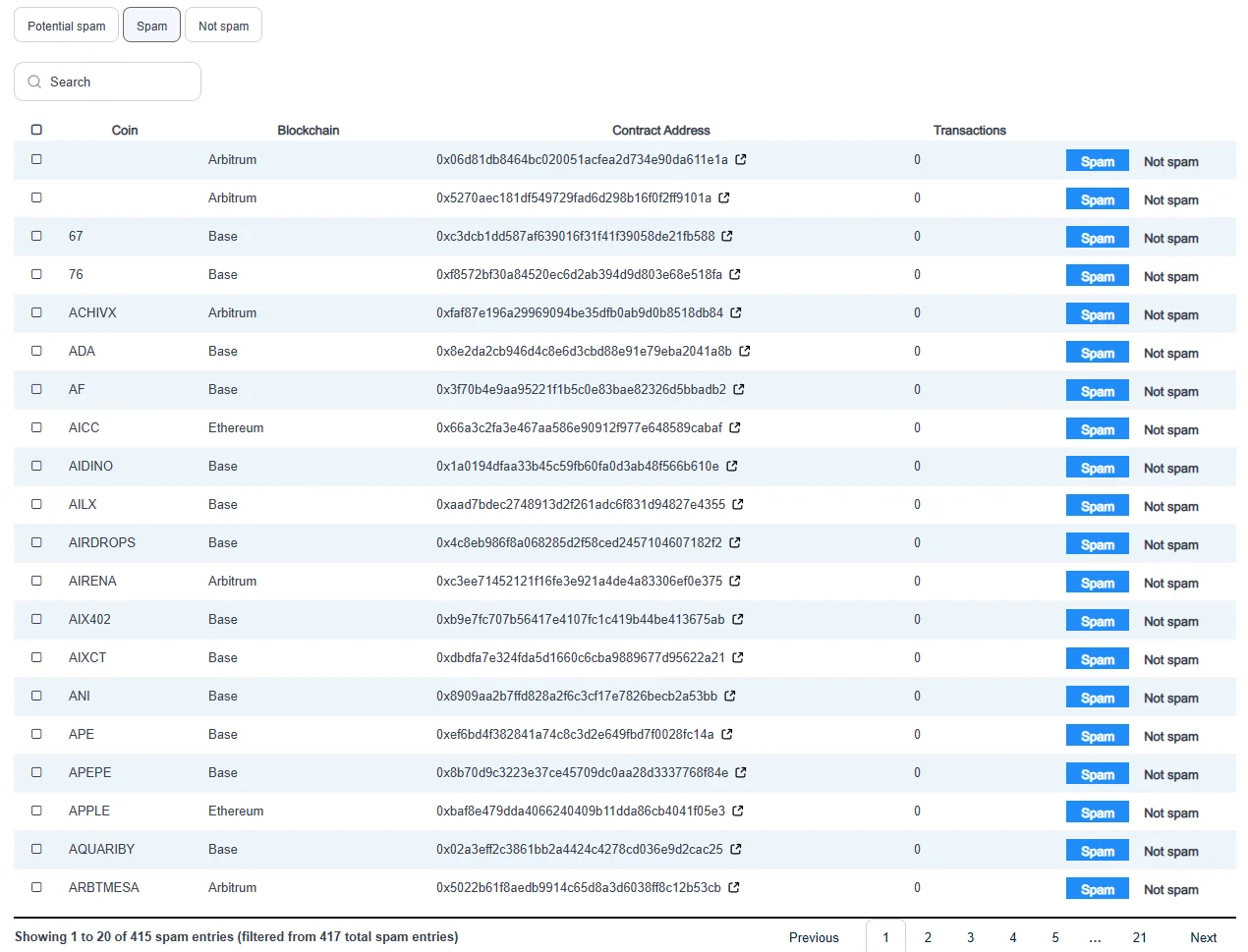
With CoinTracking, it frequently happens after import that spam assets use the same ticker as real coins. A typical example: you see "USDC" in the transaction overview, but it is actually a scam token using the same ticker. In the default view, this is not easy to spot. CoinTracking does address this with an additional feature: the Spam Center flags and displays potential scam token contracts. You can delete them directly from the history there. TX-Partner gives this point on token classification to Blockpit.
03 DeFi and Smart Contracts
When it comes to reading smart contracts and blockchain transactions, especially in the context of DeFi, CoinTracking offers the stronger setup. CoinTracking partially creates transactions and staking contracts automatically to complete the transaction history.
Of course, there is still plenty of manual work involved. A fully automated solution for all DeFi protocols does not exist. But for complex setups with multiple chains and DeFi protocols, CoinTracking is currently a step ahead in automation. This also factors into the later assessment of which tool is better suited for which type of user.
04 Correction Options: The Biggest Difference
This is where both tools differ fundamentally, although Blockpit is catching up and now allows significantly more edits than it did a year ago.
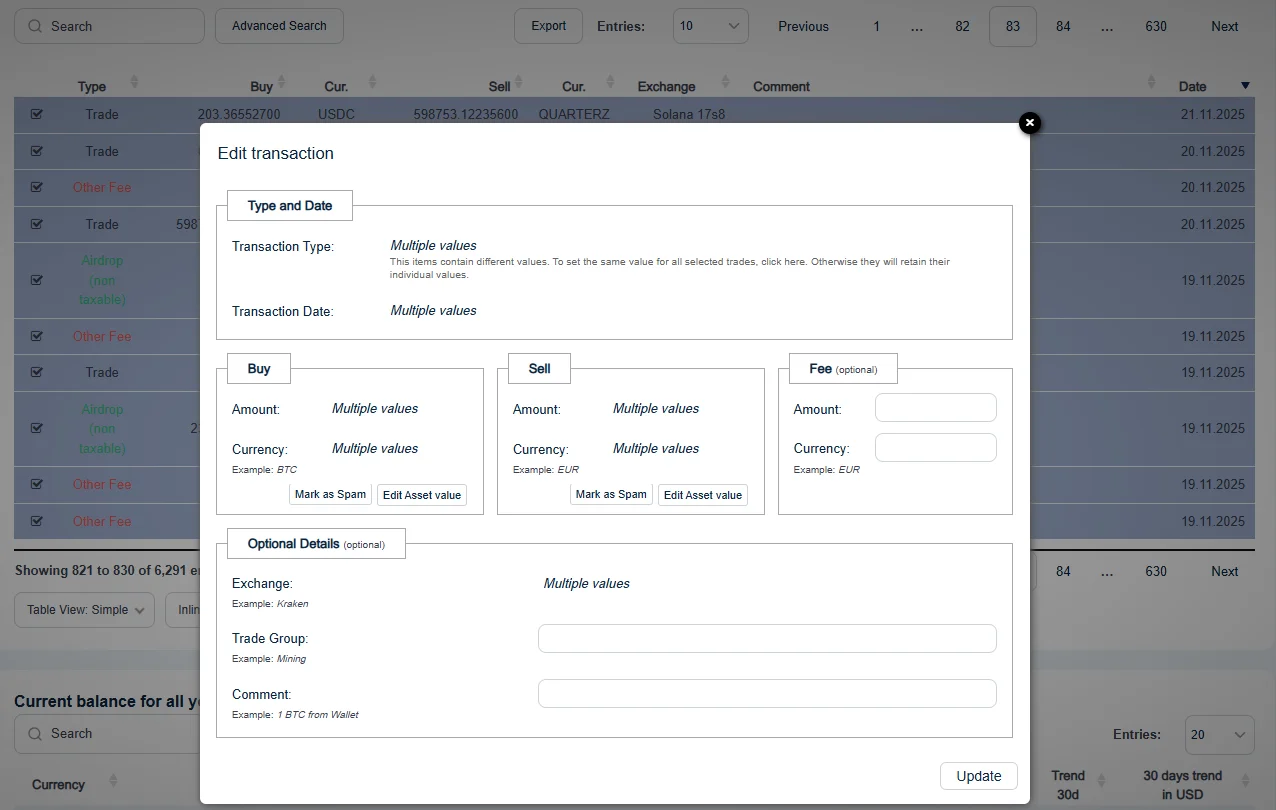
CoinTracking can best be described as a large Excel spreadsheet: you can search for anything and edit everything. No limits. Change the type, exchange name, and asset for 100 transactions at once? No problem. You can search by TX hashes, filter by deposit and withdrawal addresses, and adjust nearly any piece of information retroactively.
With Blockpit, there are limitations. Pre-classified transaction types cannot currently be changed, to the best of our knowledge. Reclassifying a trade as a withdrawal is not supported. Search functions for TX hashes or wallet addresses are also missing. For their users, this is often the right approach, as it reduces the risk of accidentally changing something incorrectly.
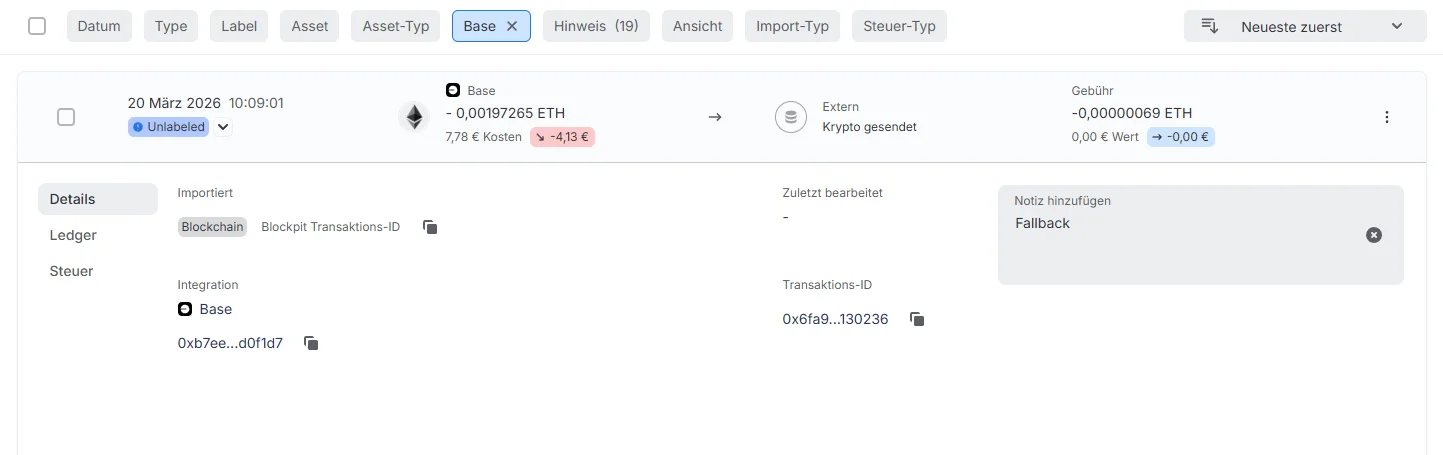
What Blockpit does handle well: you can click directly on a transaction hash and land in the blockchain explorer. With CoinTracking, that requires copy-paste.
New in 2026: traceability of changes
Since 2026 a dimension has been added that shifts the comparison – without reversing the basic split. Blockpit now logs what was changed and how per transaction: a dedicated „Edits“ tab shows every modification and restores the original state via „Reset transaction“. Transactions can also be flagged as „Marked for review“ or „Marked as reviewed“ and filtered accordingly.
CoinTracking has no equivalent. Both tools show where a transaction came from – whether it originated from an API import, a CSV file or manual entry. Whether someone edited it afterwards is not visible there.
Why this matters in practice
In a multi-year cleanup the decisive question is often not „is this figure correct“ but „how did it come about“. Anyone taking over a portfolio someone else has already worked on has to distinguish imported raw data from assumptions added later. That is exactly where a change log helps – and exactly where unlimited editing without a log becomes a risk.
The overall split stands: CoinTracking gives you more freedom, Blockpit gives you more safety. What is new is that Blockpit now documents that safety, instead of producing it through restriction alone.
05 Tax Report: Flexibility vs. Fixed Framework
In CoinTracking, you can select different calculation methods, activate portfolio separation, change the country, and adjust numerous other settings in the tax report. CoinTracking has simplified these advanced options: they are no longer visible by default and must be accessed through a specific filter. However, the options remain extensive and give you full control when needed. At the same time, this means you need to know what you are doing. A wrong setting can distort the entire tax report.
Blockpit takes the opposite approach. You get a fixed tax framework for your country. You cannot change anything, but you also do not need to configure anything. The framework calculates automatically according to applicable rules. For Austria, this means: AVCO method, 27.5% KESt, no taxable event for crypto-to-crypto trades. For Germany: FIFO, one-year holding period, personal tax rate.
This reduces the risk of misconfiguration. At the same time, the flexibility is missing when you have a special case that deviates from the standard.
06 What switching tools actually costs
Most people searching „CoinTracking or Blockpit“ are not starting out. They are already in one tool, unhappy with it, and considering a move. Hardly any comparison answers that question – migration guides read as if it were one export and one import.
The data transfer itself is the easy part. What takes effort is everything after it:
Labels and classifications do not travel with the data. What you sorted over weeks in the old tool comes back unclassified in the new one. The label sets are not congruent either: one tool has dedicated labels for prediction markets, the other does not; one has specific LP labels, the other groups them. There is no clean one-to-one translation – in places you have to decide again.
Fees are calculated and displayed differently. Whether a fee is kept as a separate event or folded into the transaction differs between tools. After a switch, holdings or results can therefore deviate even though every transaction was carried over.
Chronology can shift. For simultaneous or closely sequential events the tools do not necessarily sort identically. That sounds marginal, but it is not: the order co-determines which holding is matched against which disposal.
The honest answer to „should I switch?“
If your current tool runs cleanly and only the interface annoys you, switching rarely pays off. If your setup has structural problems instead – missing history, holdings without origin, dead exchanges – you carry those problems into any new tool. The switch does not solve them, it relocates them. In that case cleaning up the data is the actual task, and the tool question then almost answers itself.
07 Decision guide by profile
Four questions lead to a reliable answer in practice. They are ordered by weight – the first one decides most often.
-
1. How many tax years are you working through?
Several years retroactively → CoinTracking, because one subscription covers all years. Only the current year → cost is not the deciding factor. -
2. How high is your DeFi and multichain share?
Many chains, bridges, LPs, NFTs → CoinTracking, for the freer editing on bulk corrections. Mostly exchange trading → Blockpit, because the guided system allows fewer mis-operations. -
3. Do you regularly need a source-of-funds report?
Yes → Blockpit has the more mature native report; CoinTracking now offers one as well. In both cases the underlying data decides. -
4. How far back does your history reach – and is it complete?
Gaps, dead exchanges, holdings without traceable origin → the tool question is secondary. Both tools calculate on what is there. Reconstruction first, tool decision second.
„Is there an alternative?“ – three readings of the question
People asking for an alternative usually mean one of three things. First: the tool is too expensive. Then the pricing model deserves the attention rather than the brand – per tax year versus annual subscription makes a bigger difference on multi-year cleanups than the choice of vendor. Second: the tool cannot handle their setup. Then the question is whether another tool does not hit the same limit – on DeFi edge cases and incomplete history, all of them do.
Third, and the most common case in our practice: the report looks wrong and the tool gets the blame. In that situation the alternative is usually not a different piece of software but a more complete data set. Switching tools on an incomplete history produces the same figures in a different interface.
08 Which Tool Suits Whom?
CoinTracking is, in TX-Partner's assessment, a professional tool. The user interface is more complex, the configuration options are more extensive, and the learning curve is steeper. In return, you get the ability to edit and customize virtually everything. This makes CoinTracking the first choice for power users with many thousands of transactions, extensive multichain activity, DeFi, NFTs, and for accounting services like TX-Partner that need to efficiently process large volumes of transactions.
If your transaction history is manageable, you need few integrations, and you do not want uncertainty about whether you might misconfigure something in the tax report, then Blockpit is the better choice. The fixed tax framework takes decisions off your hands and reduces potential sources of error.
Pricing is another factor that often gets overlooked. CoinTracking works as an annual subscription, you pay once and can generate unlimited tax reports across as many years as you need. Blockpit charges per tax year: each report is a separate purchase. If you're catching up on multiple years at once, CoinTracking is usually cheaper. If you only need one current report and have a manageable transaction count, Blockpit can be the more affordable entry point.
| Criterion | CoinTracking | Blockpit |
|---|---|---|
| Data Import | Individual, strong CSV | EVM multi-import (optional), API-first |
| Token Classification | Spam Center (retroactive) | Contract verification (native) |
| DeFi Automation | Stronger, auto-contracts | Basic |
| Correction Options | No limits, bulk edits | Limited, guided |
| Tax Report | Flexible, many options | Fixed tax framework |
| Learning Curve | Steep | Gentle |
| Support | Ticket, email, Discord | Community, forum, in-app chat |
| Target Audience | Power users, DeFi, services | Beginners, manageable TX |
| Pricing Model | Annual subscription from €39/yr, all tax years & reports included | One-time purchase per tax year from €49/report (depending on TX count) |
| AT/DE Tax Law | Manually configurable, default based on account region | Fixed framework per country, automatically applied |
| Cost Basis with Missing History | Set to €0 | Set to €0 |
| Bridges & Multi-Chain | Stronger automation, manual cleanup still needed | More basic, more manual cleanup needed |
09 Support and Community
Blockpit relies heavily on community. In addition to a help center with over 250 articles, there is an active German-language forum, Telegram and Discord channels, and an in-app chat as the primary support channel. If you have a question, you will usually find an answer quickly, either from other users or directly from the team.
CoinTracking takes a more traditional approach: Freshdesk knowledge base, email support (Mon-Fri, typically responding within 24 hours), and a ticket system. There is also a Discord server. In a professional context, TX-Partner rates CoinTracking's support as highly constructive. For complex cases, the team works in a solution-oriented manner and responds reliably.
For end users seeking quick help in their language, Blockpit currently has the edge with its community approach. For professional users and accounting services, CoinTracking's direct ticket support is often the more efficient path.
10 How TX-Partner Approaches the Tool Choice
For new crypto accounting assignments where no tax tool is in place yet, TX-Partner carefully evaluates the choice and discusses it with the client. The decision depends on several factors: the activity profile, the number of integrations, and whether the client wants to manage the tool themselves going forward.
If someone is exclusively active on Solana, there are sometimes even more specialized tools that handle this chain better than the major platforms. TX-Partner always tries to find the best setup for each individual case. The goal: both the client and TX-Partner can work efficiently, and accurate tax reports are generated.
TX-Partner is tool-agnostic, not tied to either CoinTracking or Blockpit, no commissions. The client's needs and requirements come first. That makes TX-Partner more than just tool support: an independent accounting service that works with any tool.
11 What CoinTracking and Blockpit Both Cannot Solve
The question "CoinTracking or Blockpit?" assumes that the right tool solves the actual problem. In many cases, it does not. No crypto tax tool independently identifies which wallets and exchanges a user has historically used. No tool reconstructs missing transactions from before an API import was set up. And no tool can calculate a complete cost basis from an incomplete transaction history.
Across 600+ cases, a clear pattern emerges: when a tax report shows wrong numbers or warnings, the problem is almost never the tool itself. It is the data underneath. CoinTracking and Blockpit calculate correctly, but only with what was imported. Whatever is missing from the transaction history is also missing from the report. Which tool handles that better or worse does not change the result.
In Germany, an incomplete history means: the one-year holding period cannot be proven, and the tax exemption is not documentable. In Austria: the acquisition costs are missing for the correct KeSt calculation under AVCO. Both have direct tax consequences regardless of which tool is used.
If you have reached that point, a different tool is not the answer. What helps is professional crypto accounting: the complete reconstruction of the transaction history before the tool calculates. What TX-Partner does in practice and when it makes sense is described on this page.

Co-Founder, Crypto Accounting
Robert Thorn is Co-Founder of TX-Partner. Brings experience from over 600 documented crypto portfolios, from simple Bitcoin trading to six-figure DeFi setups across multiple chains and years. Closes the gap between raw data and clean documentation for tax and banks.