
Key takeaways
Account Health collects the open tips in your Blockpit account and shows a percentage at the top. That percentage is 100% minus the impact values of four categories: Missing History, Mismatched Balance, Labeling and Missing Value.
- ✓ Don't start with the highest impact. Start per integration with Missing History and Mismatched Balance. Labeling comes last.
- ✓ An Auto-Correction raises the score just as much as real evidence does. It is booked at a value of €0.00.
- ✓ The score doesn't show how many tips change your calculation in the tax report.
- ✓ You fix tips in the transaction list, not on the Account Health page.
Account Health is Blockpit's overview of every open tip in your account, and the percentage at the top is nothing more than 100% minus the impact values of the four tip categories. We recalculated this on three consecutive states of a real account, and it matched every time, apart from rounding. We haven't found a public explanation of this calculation from Blockpit. In its own blog, Blockpit describes the score as the "percentage of transactions without unresolved tips." With this account's numbers, that doesn't add up. More on that below.
In our first consultations, scores between 40 and 70% are entirely normal, and sometimes they're lower. Whether your number is high or low, the number alone won't tell you. The list underneath tells you more, once you know how to read it and in what order to work through it. That's what this article is about.
01 What does the Account Health tab show?
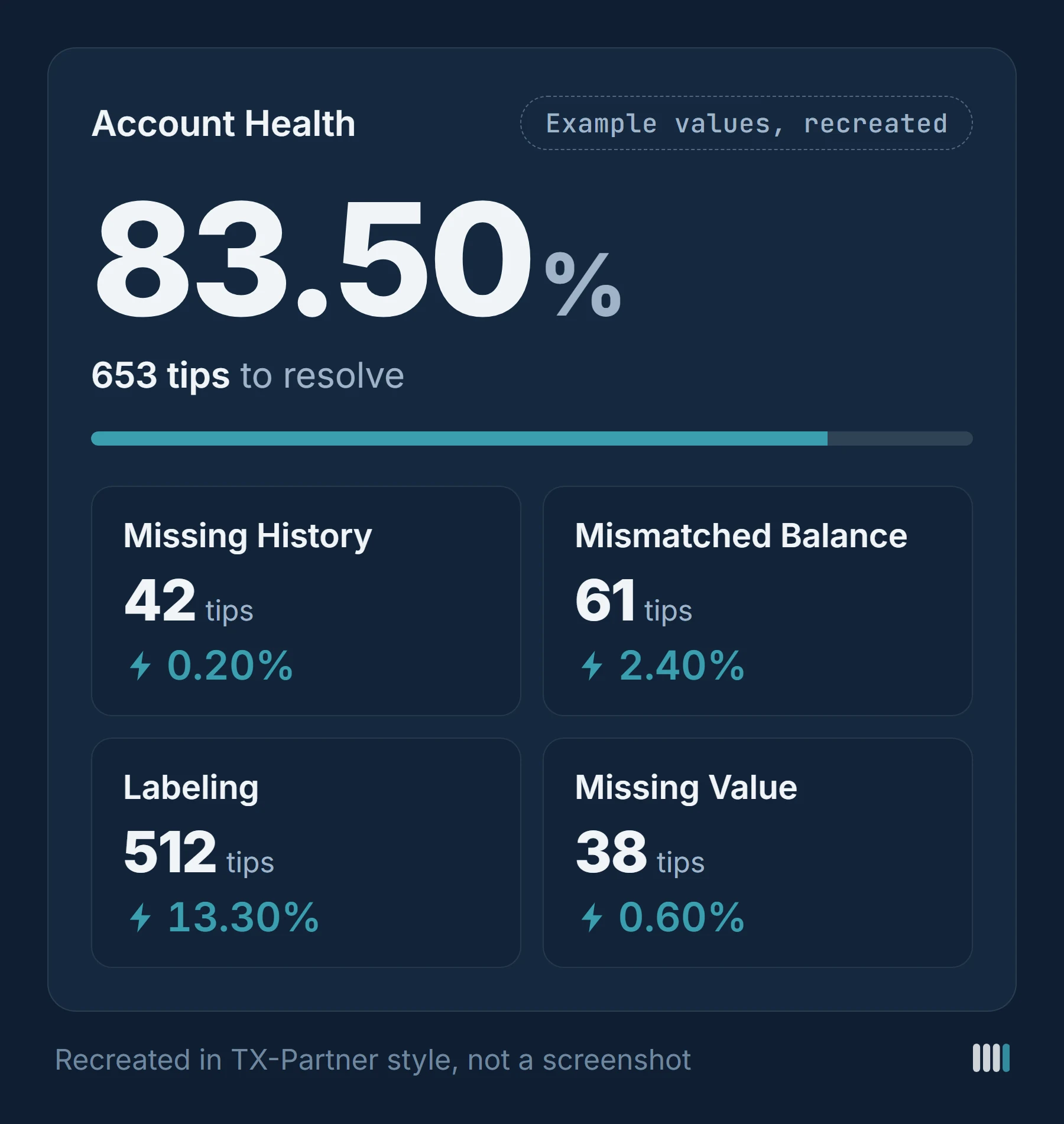
At the very top is the score as a percentage. Below it you see how many tips are left to resolve, and the four categories, each with its count: Missing History, Mismatched Balance, Labeling (the Help Center calls it "Labels and transfers") and Missing Value. Next to the count, every category shows an impact value in percent, marked with a small lightning bolt.
Next to the categories, a box explains why the score matters. According to Blockpit, a score of 100% is important for a correct tax report, and you should work through the categories one after another, starting with the highest impact. Further down, the tab lists your integrations with their transaction count and a button to update each one. If an integration is outdated, it shows up in the tab as a tip under API Re-authentication.
When you open a category, Blockpit asks you to work through it from left to right. You can filter by date, label, asset and integration, and sort the list so the tips with the highest impact come first.
02 How is the percentage calculated?
Add up the four impact values, subtract the total from 100, and you have the score. Here's an example:
| Category | Tips | Impact |
|---|---|---|
| Missing History | 42 | 0.20% |
| Mismatched Balance | 61 | 2.40% |
| Labeling | 512 | 13.30% |
| Missing Value | 38 | 0.60% |
| Total | 653 | 16.50% |
| Account Health | 100% − 16.50% = 83.50% |
Example values, rebuilt. We checked the calculation itself on a real account.
What stands out in the table: the number of tips says little about their weight. 512 tips under Labeling take 13.30 points off the score, while 42 tips under Missing History take off only 0.20. That isn't a quirk of the example. In the real account the ratio was similar. When a single tip was closed, the impact of the Missing History category fell by more than half, from 0.20 to 0.09% in the example, and by a similar amount in the real account. That one tip weighed more than all the other tips in its category combined.
How Blockpit arrives at a category's impact isn't disclosed. Robert suspects that for Missing History it depends on the missing value in euros, so a tip about a large holding would weigh more than many small ones. That would fit with the field in this category's view that adds up the missing value in euros. It isn't proven, though. The only thing proven is the sum.
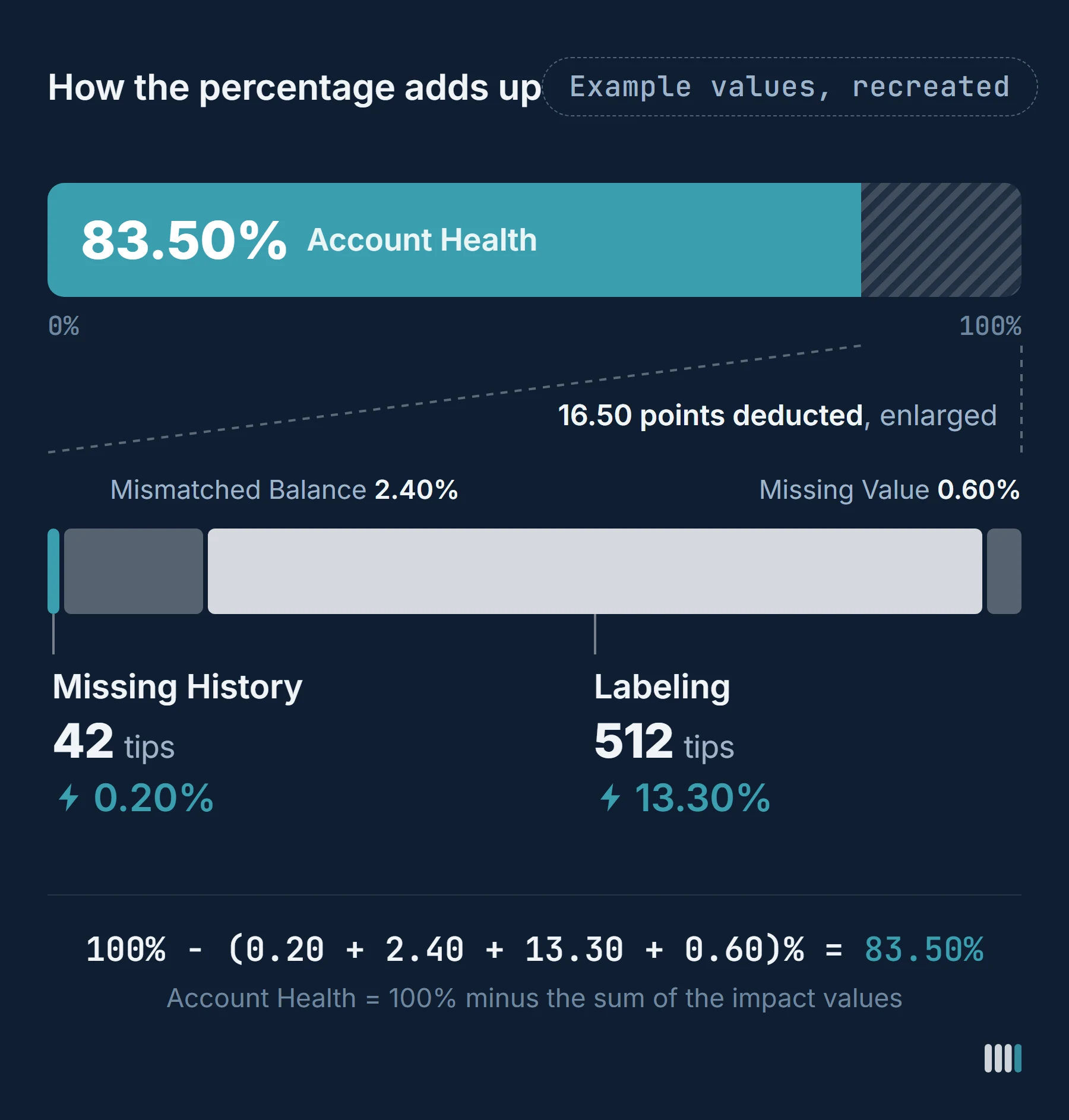
Measured against what? The obvious reading would be the one Blockpit gives in its blog: the share of transactions without open tips. We checked that against the real account, and it doesn't add up. The account had around 13,000 transactions and just over 700 open tips. Even if every tip sat on a transaction of its own, only about 5.6% of the transactions would have an open tip. Yet Blockpit took off just over 21 points. Tips weigh very differently depending on the category: on average, a Mismatched Balance tip cost around 0.14 points, a Labeling tip around 0.03, and a Missing Value tip less than 0.01.
So the score isn't an error rate. It won't tell you how many of your movements are actually open or wrong. That's why Robert Thorn, co-founder of TX-Partner, looks at it differently in practice. Errors arise mainly in inflows and outflows that aren't recognized correctly or aren't linked to each other, meaning deposits, withdrawals and transfers. A trade on a centralized exchange rarely, if ever, contains an error. So errors should be measured against inflows and outflows, not against all transactions.
A worked example, not a real case: an account has 10,000 transactions. 9,500 of them are trades on an exchange, and 500 are deposits and withdrawals. On top of that there are 400 labeling errors, meaning deposits and withdrawals that aren't recognized correctly or aren't linked. Measured against all 10,000 transactions, that's 4%, which sounds like an account that's nearly done. Measured against the 500 deposits and withdrawals where the errors actually sit, it's 80%. Of the movements that explain where your coins came from and where they went, only one in five is right.
How much the number varies in practice is something we see in first consultations: values between 40 and 70% are common. One account with little trading and a lot of DeFi was at 40%.
03 Why does the score go up when nothing has been proven?
For missing history, Blockpit offers the Auto-Correction, a transaction label that used to be called Auto-Balancing. It fills in the missing holding. In the transaction list it then appears as an Auto-Correction line of its own, as an inflow directly before the outflow. The entry is recorded as crypto received from an external source, with the amount of the asset, and it is booked at a value of €0.00. So the cost basis for that amount is 0. You can only create an Auto-Correction in the ledger view of the transaction list.

As far as the score is concerned, that's no different from real evidence. We watched a Missing History tip being closed with an Auto-Correction: the category counted one tip fewer afterwards, and the score rose by a little over a tenth of a percentage point. If the purchase had been added from records instead, it would have risen just the same.
So the tip disappears and the score goes up. The data doesn't become any more correct. The Auto-Correction balances the holding, but where it came from stays open. If that amount is sold later, the calculation applies a cost basis of 0 to it.
Anyone who works their score up with Auto-Corrections ends up with a nicer number and the same gap as before. You just can't see it anymore.

04 What the percentage doesn't show
The score tells you how much impact is still open. It doesn't tell you how many of the open tips affect the calculation in the tax report, or how much ends up assigned differently there as a result. In one account we've seen, just under 80% stood next to more than 700 open tips. The number doesn't have to be miscalculated for that. But 80% sounds almost done, and 700 open tips sound like something else.
In Blockpit's tax report, this becomes visible in two places. In the German report, both sit on the tax-free overview page (German: „Gesamtübersicht · Steuerfrei“). Transactions with a missing label get lines of their own there: Missing Label (In) is listed among the tax-free inflows, and Missing Label (Out) among the other tax-free disposals. The Auto-Correction also appears among the tax-free inflows, under a label of its own. A footnote in the report gives Blockpit's reason: „Beim Zufluss wird ein Marktwert von €0 angesetzt, da es sich steuerlich um einen unentgeltlichen Erwerb handelt“ (a market value of €0 is applied to the inflow because, for tax purposes, it is an acquisition free of charge).
So where a line lands in the report depends on its label. What actually happened behind a missing-label line, whether it was a swap, a transfer between your own wallets or something else, you can't tell from the line itself. And for the Auto-Correction, as Robert points out, the report doesn't show what market value the assets had that were booked at €0 this way. Yet that very sum would say a lot about how complete and correct an account is. In his experience, a report in which many lines consist of Auto-Corrections and missing labels raises questions, whoever reads it: where did this holding come from, and what happened here? The percentage in the tab shows none of this.
Blockpit points this out itself. Its own tax guide (in German) has a box headed "Account Health is no guarantee of correctness", which says: "A high Account Health value is no proof of a tax return that is complete for tax purposes or correct in the individual case." Right after that: "Even with a high value, incorrect labels or incomplete facts may remain." (Box title and both quotes translated from the German guide.) The two fit together: 100% is a goal, not proof.
05 Where do you start? Order, not impact
In that box, Blockpit advises starting with the highest impact. We work differently, because our goal is a complete, documented history, regardless of impact values.
- Per integration, start with Missing History and Mismatched Balance. Both point to missing data, for example because an API import was incomplete and you need to fill the gaps with a CSV file.
- Then import and correct with real evidence until there's no Missing History left, every integration is in and the holdings match. That includes re-syncing outdated integrations. If new transactions come in along the way, other transactions can then be linked to them. Only once all of this is in place are all inflows and outflows fully captured.
- Only then link and label.
As Robert puts it: labeling comes after that, because first you have to be sure that everything is in there that should be in there.
The reason is simple. In the account we saw, Labeling had the highest impact, and in the example above it accounts for 13.30 of the 16.50 points. If you start there, you're labeling transactions whose counterpart may not even be imported yet. Whether something was a trade or a transfer then can't be decided on screen, only from the raw data. The label is a guess at that point, even if the tip disappears.
06 Reading the list: what's behind each category
Every category has its typical causes, and you only get to know them after seeing a lot of accounts. For an overview of all the tips Blockpit shows, see our page on Blockpit issues.
Missing History. According to Blockpit's Help Center, it means that in an integration "more of an asset went out than was there before according to your transactions." The clean way to close the tip is to import the missing source and recalculate. An Auto-Correction makes it disappear as well and raises the score, but the origin stays open.
Mismatched Balance. Here Blockpit compares the holding the exchange or wallet reports (the Synced Balance) with the holding it calculates from your transactions. In our experience, the most common cause is exchanges. Their APIs don't deliver everything, you often need the CSV as well, or the API doesn't cover the whole period in which you were active. That happens even with integrations imported exactly according to the instructions. How to narrow down and fix a mismatch like this is shown in our guide to fixing a wrong balance in Blockpit.
Labeling. This is where the transactions with Missing Label (In) and Missing Label (Out) sit, the ones whose type Blockpit didn't recognize. This used to be called Unlabeled. In the transaction list, you can show both directions separately with the tip filter. The most common causes are forgotten integrations or ones that no longer exist, and anything to do with DeFi and bridging.
One example hardly anyone has on their radar is swapping directly in Ledger Live. If you swap BTC for USDC there, the tool shows a BTC outflow on the Bitcoin blockchain and a USDC inflow on Ethereum. In the background, the swap runs through a provider that Ledger Live integrates, and the tool doesn't recognize that the two entries belong together. If you then look it up in a block explorer, you find exchanges you've never used yourself, and that's confusing.
Then there are things that only exist on certain chains, plus spam and address poisoning. On Solana, for instance, every account holds a small minimum balance in SOL, known as rent. When a token account is closed, that balance flows back to a destination account, usually your own. With address poisoning, attackers send small amounts from an address that looks deceptively similar to one you know from your history, hoping you'll copy it from there later. Tips like these have little impact, but they can still look like a lot, Robert says. And in our experience, more than half of all labeling tips have a data gap behind them, not just labeling work. How to sort out these transactions step by step is covered in our guide to fixing unlabeled transactions in Blockpit.
Missing Value. Here Blockpit has no traceable price feed for the asset. Typical cases are airdrops, unknown scam tokens, NFTs and wrapped assets on lesser-known blockchains. You can enter the value by hand: either you add the real value, or you set it to 0 and save. Setting it to 0 doesn't change the calculation, because as long as the value is missing, Blockpit calculates with 0 anyway; it only closes the tip. That makes sense, for example, for spam inflows you want to keep in your data. If the asset did have a real value, only the real value changes the calculation.
Spam. If you mark a transaction as spam or hide it, it disappears and the score goes up. A single spam inflow can carry two tips at once, Missing Label (In) and Missing Value, and both go away. Spam marking is meant for genuine fake, scam and phishing inflows. If you use it to hide real tokens you once traded, you take all of their transactions out of the calculation, including swaps into other coins, and you create Mismatched Balance tips in places that seem to have nothing to do with it.
Where you fix the tips. You don't resolve anything on the Account Health page itself. Fixes happen in the transaction list. The score appears there again as a banner, which calls it decisive for a correct and fully optimized tax report. With the tip filter you go straight to Missing History, Missing Value and Missing Label (In) or (Out). Mismatched Balance is shown in the integrations overview on the dashboard. Then start the recalculation with the button, because Blockpit doesn't update anything on its own after a change.
07 When is it no longer something you can solve yourself?
There's no fixed threshold, neither a percentage nor a number of tips. Whether and when to hand over your data differs from case to case. The account with just under 80% and more than 700 open tips mentioned above belongs to a client. He handed his data over to us because he could no longer fully reconstruct his old history.
Three situations where we would take a closer look:
- You can only close a tip by guessing. If you link transfers by gut feeling because the amount and time roughly match, or dump everything unclear into one category, the tip goes away, but you don't get the right cost basis. The error then carries over into every following year.
- You can't tell on screen whether it was a trade or a transfer. Then only the raw data can settle it, with an on-chain analysis and a search for the other side of the transaction.
- The origin lies before your first import. On exchanges that no longer exist, or in wallets you never imported. Whether it can be reconstructed depends on what data you can still get: old exports, a GDPR data request, the transfers on the blockchain.
If you're at one of these points, look at what your list shows together with us in a consultation. The 30 minutes are free, and the price for preparing your data is fixed before you commit.

Co-Founder & Crypto Accounting Pioneer
Robert Thorn is Co-Founder of TX-Partner and has worked in crypto data preparation since 2021. Together with Johannes Anderl he brings experience from over 600 cases since 2021, from simple Bitcoin trading to six-figure DeFi setups across multiple chains and years. Closes the gap between raw data and clean documentation for tax and banks.